微信支付
流程
- 获取商户号
微信商户平台:https://pay.weixin.qq.com/ 步骤:申请成为商户 => 提交资料 => 签署协议 => 获取商户号
- 获取AppID
微信公众平台:https://mp.weixin.qq.com/ 步骤:注册服务号 => 服务号认证 => 获取APPID => 绑定商户号
- 申请商户证书
步骤:登录商户平台 => 选择 账户中心 => 安全中心 => API安全 => 申请API证书 包括商户证书和商户私钥
- 获取微信的证书
可以预先下载,也可以通过编程的方式获取。
- 获取APIv3秘钥(在微信支付回调通知和商户获取平台证书使用APIv3密钥)
步骤:登录商户平台 => 选择 账户中心 => 安全中心 => API安全 => 设置APIv3密钥
开发案例
引依赖
写配置类
写配置
使用
以下涉及的共有的内容
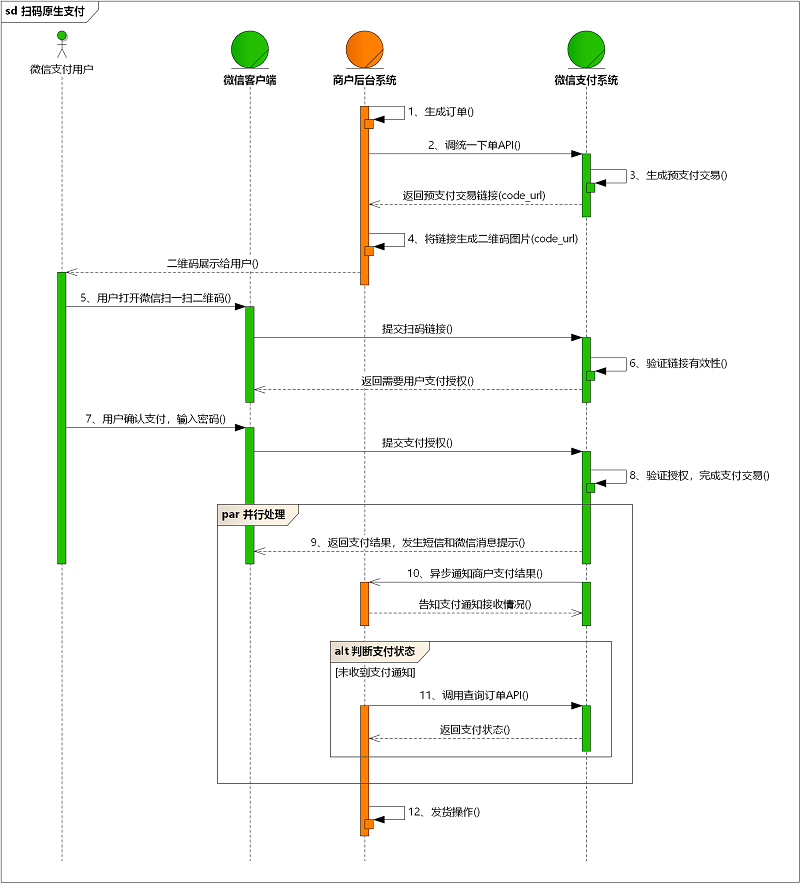
支付
流程图:
 创建支付
创建支付
https://pay.weixin.qq.com/wiki/doc/apiv3/apis/chapter3_4_1.shtml
支付通知
https://pay.weixin.qq.com/wiki/doc/apiv3/apis/chapter3_4_5.shtml
查询支付
https://pay.weixin.qq.com/wiki/doc/apiv3/apis/chapter3_4_2.shtml
取消支付
https://pay.weixin.qq.com/wiki/doc/apiv3/apis/chapter3_4_3.shtml
退款
创建退款
https://pay.weixin.qq.com/wiki/doc/apiv3/apis/chapter3_4_10.shtml
退款通知
https://pay.weixin.qq.com/wiki/doc/apiv3/apis/chapter3_4_11.shtml
查询退款
https://pay.weixin.qq.com/wiki/doc/apiv3/apis/chapter3_4_10.shtml
账单
查询交易账单(注重交易双方)下载URL
https://pay.weixin.qq.com/wiki/doc/apiv3/apis/chapter3_4_6.shtml
查询流水账单(只注重商户)下载URL
https://pay.weixin.qq.com/wiki/doc/apiv3/apis/chapter3_4_7.shtml
获取账单(包括交易/流水)数据
https://pay.weixin.qq.com/wiki/doc/apiv3/apis/chapter3_4_8.shtml
完整下载账单的操作
支付宝支付
支付宝相对于微信支付更人性化,且细节做得更好。
标识商户身份的信息、商户的证书和私钥、支付宝的证书、支付宝API的URL
正式环境
1.创建应用
2.绑定应⽤
3.配置秘钥
4.上线应⽤
5.签约功能
沙箱环境(虚拟环境)
引依赖:
写配置类
写配置
开发案例
以下涉及的共有的内容
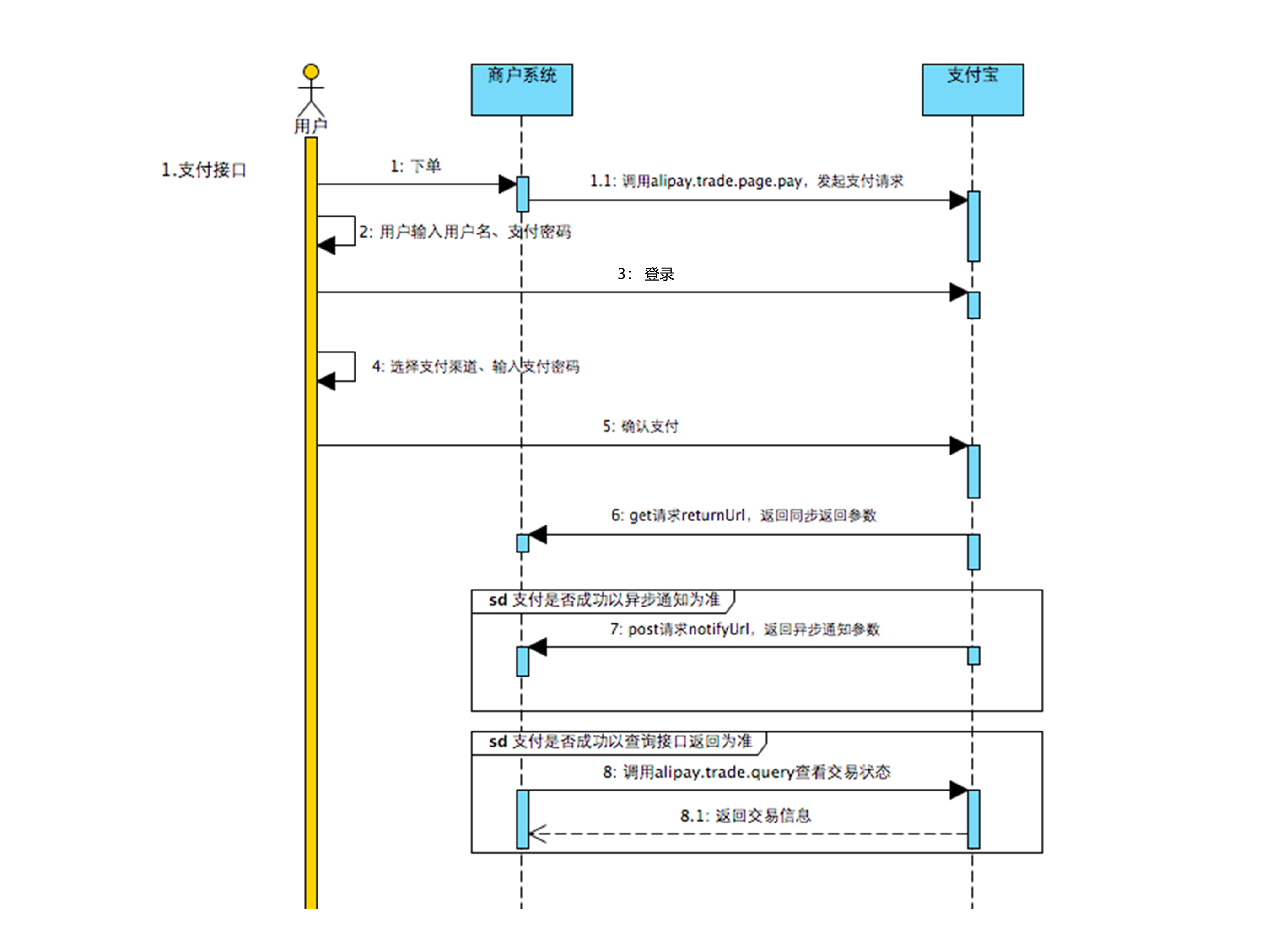
支付
流程图
 创建支付
创建支付
https://opendocs.alipay.com/apis/028r8t?scene=22
支付通知
https://opendocs.alipay.com/open/270/105902
查询支付
https://opendocs.alipay.com/open/028woa
取消支付
https://opendocs.alipay.com/open/028wob
退款
流程图
创建退款
https://opendocs.alipay.com/open/028sm9
查询退款
https://opendocs.alipay.com/open/028sma
账单
https://opendocs.alipay.com/open/028woc
查询账单下载URL